
2.X.4 Operational Tools
The STACK
At Level 2, you’re no longer duct-taping your way through operations. You’re building your Minimum Viable Company (MVC) — and that means systematizing how work gets done.
You’ve learned to manage projects and assign ownership. But now, your tools need to evolve too. Why?
Because tools do more than just move fast — they enforce process.
What You’re Actually Doing Here
- Automating repetitive tasks to free up team focus
- Hard-coding standard operating procedures (SOPs) through tools
- Enabling management to work on the business, not just in it
- Creating a unified, connected, and measurable operation
- Preparing for future scale, visibility, and control
At Level 2, you haven’t fully documented every process — but your tools often become the process. That’s not always a bad thing. Done well, the tech stack itself becomes your first layer of structure.
Early-Stage Tools to Anchor Core Workflows
1. POS & Website Integrations → Order Entry Automation
Eliminate manual entry by connecting sales platforms (e.g., Shopify, Faire, Amazon) to your Order Management System (OMS) or middleware.
Result: Fewer errors, faster fulfillment, less chaos.
2. Order Management Systems (OMS) → Backbone of Fulfillment
Capture, route, and track orders from intake to shipment.
Choose an OMS that integrates with inventory, 3PL, and accounting systems.
3. CRM Systems → Sales & Service Visibility
Centralize customer data across:
- Quotes and pipeline
- Campaigns and feedback
- Issues and service tickets
Everyone should share the same customer view.
4. Regular Tech Stack Reviews → Stay Lean & Relevant
At least quarterly, review:
- What’s critical
- What’s redundant
- What’s slowing you down
This prevents tech bloat and process drift.
Tool Integration & Automation Backbone
The real power isn’t just in individual tools, but in how they connect. Integrating your stack gives you:
- Single sources of truth
- Real-time updates across departments
- Accurate financial and operational data
Example Flow: Basic Operational Stack
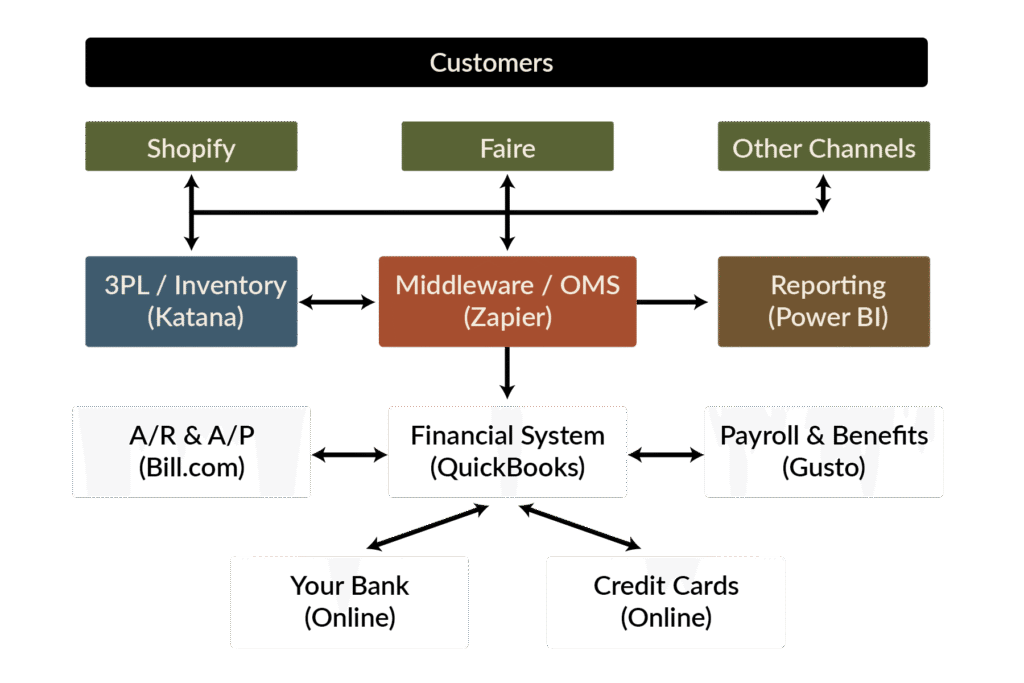
- Middleware pulls in order and fulfillment data from 3PLs
- Expense tools (e.g., Bill.com, Gusto, Brex) sync with accounting
- Everything flows downstream into your Financial System, where dollars tell the truth
Good integrations don’t just automate — they unify.
Configuration Management — Keep the Versions Clean
You first touched on this back in the SEED Stage — when you started defining where key documents live and how teams communicate. At Level 2, it’s time to take that foundation further.
As your stack grows and collaboration increases, you need lightweight version control — not just for code, but for your whole company.
Set simple standards for:
- Document Control
Define where final docs live (Notion, Google Drive, GitHub) — and who approves changes.
- Naming Conventions
Include dates and version numbers in filenames. Use consistent formats across the team.
- Change Logs
Track key updates — especially in legal, financial, operational, or external-facing materials.
- Version Ownership
Every system of record (docs, tools, dashboards) needs a clear owner to maintain the latest version.
Good version control reduces chaos and rework — and sets you up for Level 3 process maturity.
Tool Ownership = Process Control
Every major tool in your stack needs a clear owner.
This person:
- Manages user access and training
- Maintains integrations and workflows
- Is responsible for data hygiene and reporting
Tool Ownership
| Tool | Primary Owner | Backup / Admin | Notes |
|---|---|---|---|
| CRM (e.g., HubSpot) | Head of Sales | Ops Lead | Source of truth for pipeline & customer history |
| OMS (e.g., ShipStation) | Ops Lead | COO | Drives fulfillment accuracy |
| Project Mgmt (e.g., ClickUp) | PM / COO | Dept Leads | Task ownership, sprint velocity, due dates |
| Slack or Teams | COO | All Dept Heads | Approved channel — no backchannel allowed |
| Dashboard (e.g., Google Sheets, Notion, Databox) | Finance or COO | CEO | KPI tracking hub |
No owner = no accountability. That’s how chaos creeps in.
Tools as Sources of Truth
Some tools become your dashboard. Identify which systems own which KPIs:
- CRM = Pipeline and Conversion
- OMS = Fulfillment and Delivery Rates
- Accounting = Cash Runway, Burn, Margin
- CX System = NPS, Churn, Feedback
Dashboards aren’t a separate tool — they’re a lens on your stack.
Communication Tools: Standardize the Channel
Just like rogue spreadsheets can kill clarity — rogue communication does the same.
Set clear expectations for:
- Primary Channels (e.g., Slack, Email, Zoom)
- Tool-Specific Threads (e.g., Comments inside Notion, Asana, HubSpot)
- Off-Limits Tools (e.g., personal WhatsApp for work issues)
Make authorized communication tools part of your stack — and train your team to respect the system.
Informal chat is fine — until it bypasses process and creates shadows.
How to Use This in Your MVC Phase
- Audit your stack and integrations — What’s missing? What’s duplicative?
- Assign owners for each tool and each key metric
- Map how tools connect, and ensure financial data flows downstream
- Regularly review stack fitness (quarterly minimum)
- Shut down rogue tools and channels
The goal isn’t just speed — it’s speed with control.
Bottom Line:
The right tools, used well, do more than save time — they embed discipline, reduce risk, and reveal reality.
This is how you start to build an organization that can scale without snapping.
You’ve learned to manage projects and assign ownership. But now, your tools need to evolve too.Because tools don’t just create speed — they enforce discipline and enable scale.